|
Task Management Software |
 |
|
|
|
|
| |
|
 TESTIMONIALS TESTIMONIALS
|
|
"...This is an excellent program. I'm so glad that I stumbled on to this when researching for task management programs. Very low learning curv, quite flexible, and the price is right. Tried at least 20 other programs, either too complicated, too expensive, or poor documentation..."
Chad Lindsey -
Honolulu, HI
|
|
|
|
|
|
|
|
Office Organization Checklist |
|
|
|
|
|
|

 |
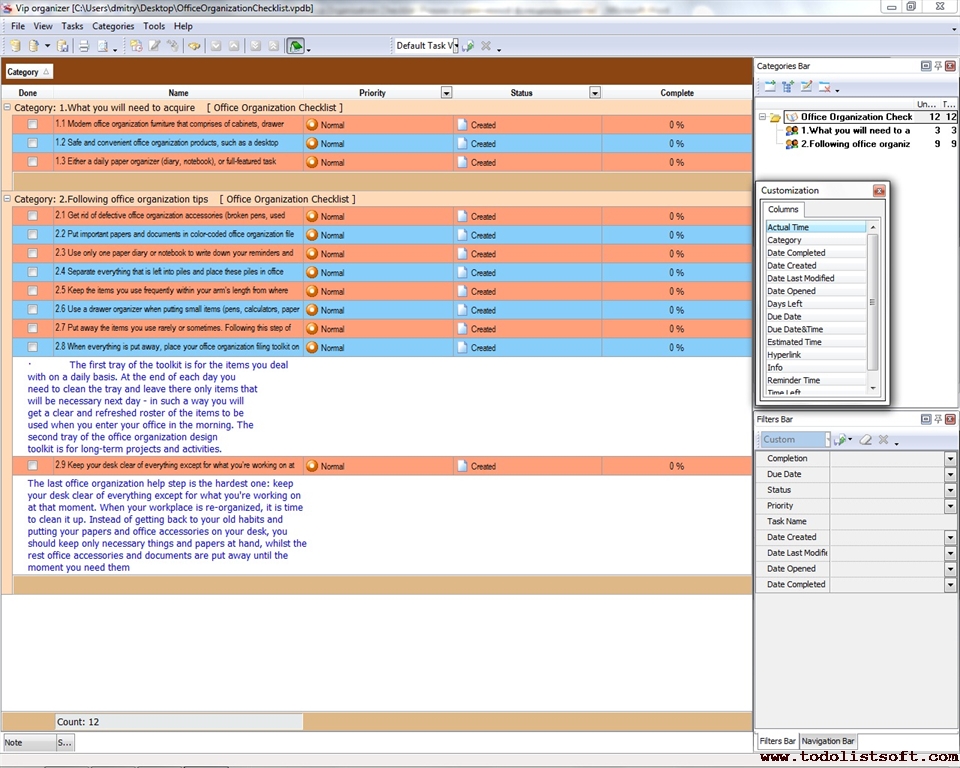
It is important to develop and implement an office organization strategy that helps re-organize your workplace at the office of your company. The given below office organization checklist is designed to show how your office workplace can be organized in order to maximize your productivity and reduce an amount of time wasting.
office-organization-checklist.zip 6.2 Kb
|
| Order 750 checklists in MS Word and PDF printable format at $49.99 USD only. |
BUY NOW!  |
- What you will need to acquire
- Modern furniture that comprises of cabinets, drawer organizers and desks.
- Safe and convenient products, such as a desktop organizer with two trays, colored file folders, and other accessories.
- Either a daily paper organizer (diary, notebook), or full-featured task management software (VIP Task Manager is preferred).
- Following tips
- Get rid of defective accessories (broken pens, used paper sheets, etc.) by donating, recycling or just throwing them out.
- Put important papers and documents in color-coded file folders.
- Use only one paper diary or notebook to write down your reminders and tasks, because having only one place for keeping your notes will eliminate clutter and make it easier for you to track your daily duties. However, most consultants suggest using task management software as an alternative to your paper diary. You may choose VIP Organizer software.
- Separate everything that is left into piles and place these piles in boxes according to how often you use those items. The boxes should be marked with codes that let you know which items are stored in each box.
- Keep the items you use frequently within your arm's length from where you sit, so it’ll be easier for you to reach any of the items.
- Use a drawer organizer when putting small items (pens, calculators, paper clips) in drawers of your cabinets. You need to designate each drawer and its compartments for one type of the items, so your pencils and pens will be stored in a compartment separate from paper clips and drawing pins (which will be also put in an storage compartment separately from other items).
- Put away the items you use rarely or sometimes. Following this step will let you keep the items not within your arm’s length but at the place you can easily access.
- When everything is put away, place your filing toolkit on your desk. The first tray of the toolkit is for the items you deal with on a daily basis. At the end of each day you need to clean the tray and leave there only items that will be necessary next day – in such a way you will get a clear and refreshed roster of the items to be used when you enter your office in the morning. The second tray of the design toolkit is for long-term projects and activities.
| Order 750 checklists in MS Word and PDF printable format at $49.99 USD only. |
BUY NOW! |
|


 |
CentriQS Tasks Management Solution 
Looking for multi-user task management software? Try CentriQS complete task management solution for planning, tracking and reporting tasks, projects, and schedules. Increase productivity of your small business or office by better organizing your employees' tasks and time.
 FREE Download CentriQS FREE Download CentriQS
|
|
|
|
|
|
|
|
|
|
| CentriQS -15% OFF |
All-in-one business management software
for small and midsize enterprises |
|
|
|
| VIP Task Manager |
Multi-user project management software
to plan, schedule and track project tasks. |
 |
|
|
| VIP Checklists
|
More than 750 ready-to-use to-do lists
to plan your personal and business life |
 |
|
|
| VIP Team To Do List |
Professional task management software
to make and send team todo lists by email |
 |
|
|
| VIP Organizer |
Personal time management software
to organize time at home and at work |
 |
|
|
| VIP Simple To Do List
|
Simple and effective to-do list software
to plan daily chores, trips, wedding, etc. |
|
|
|
|
|
|
|
|


 Play Demo >>