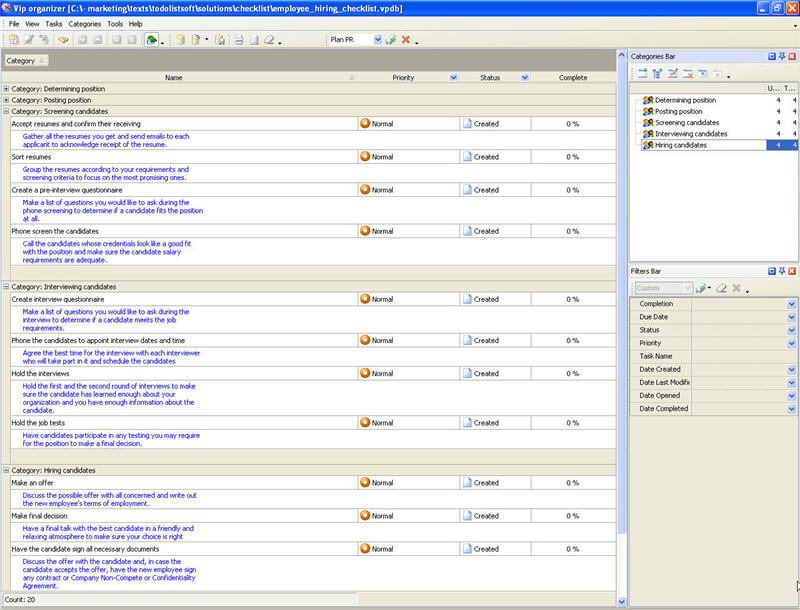
Determining position
- Make sure there is a need for the required position.
Consider the possibility to work without adding staff. Probably improving the processes, workflow optimization and workload allocation will eliminate the need.
- Write a job description which should include all essential job functions.
Discuss the job description with current employees, supervisors and coworkers to ensure the job description is up-to-date and realistic.
- Make a prioritized list of the key requirements for the position
Analyze the need in special qualifications, traits, characteristics, and experience you would like the candidate to possess.
- Determine the salary range, bonuses, commissions, etc.
Check if the department can afford hiring employees to fill the position, what minimum and maximum salary should be discussed with candidates.
Posting position
- Post the position internally.
Use bulletin board or send internal email to notify company staff that you are hiring employees to encourage talented candidates to apply for the position.
- Involve a recruiting agency.
Find several recruiting agencies, discuss the terms and conditions they offer and sign a contract with the one that meets your requirements.
- Place a classified ad in newspapers
Make a list of appropriate newspapers, write a classified ad and order the ad publishing within a week or a month.
Post the classified ad on jobs websites or professional association websites.
Screening candidates
- Accept resumes and confirm their receiving
Gather all the resumes you get and send emails to each applicant to acknowledge receipt of the resume.
Group the resumes according to your requirements and screening criteria to focus on the most promising ones.
- Create a pre-interview questionnaire.
Make a list of questions you would like to ask during the phone screening to determine if a candidate fits the position at all.
- Phone screen the candidates
Call the candidates whose credentials look like a good fit with the position and make sure the candidate salary requirements are adequate.
Interviewing candidates
- Create interview questionnaire
Make a list of questions you would like to ask during the interview to determine if a candidate meets the job requirements.
- Phone the candidates to appoint interview dates and time
Agree the best time for the interview with each interviewer who will take part in it and schedule the candidates.
Hold the first and the second ...
| Order 750 checklists in MS Word and PDF printable format at $49.99 USD only. |
BUY NOW!  |




 Play Demo >>




 FREE Download CentriQS