|
Task Management Software |
 |
|
|
|
|
| |
|
 TESTIMONIALS TESTIMONIALS
|
|
"...This is an excellent program. I'm so glad that I stumbled on to this when researching for task management programs. Very low learning curv, quite flexible, and the price is right. Tried at least 20 other programs, either too complicated, too expensive, or poor documentation..."
Chad Lindsey -
Honolulu, HI
|
|
|
|
|
|
|
|
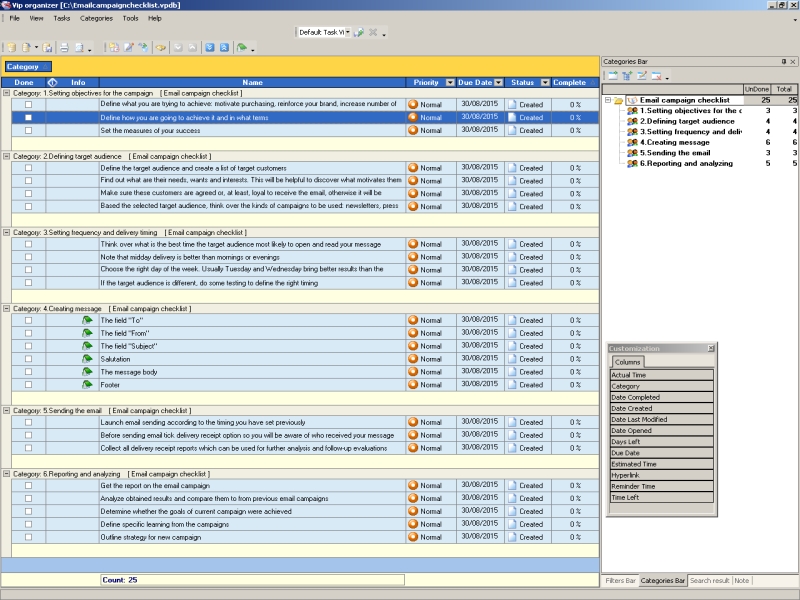
Email campaign checklist |
|
|
|
|
|
|

 |
Email is one of the most powerful and convenient marketing tools available for small companies. With help of emailing, the businesses can cost-effectively strengthen existing relationships, initiate new partnerships and convert one-time visitors (buyers, members etc.) into long-term customers. The email campaign checklist will show you how to establish successful relationships with partners and customers through emailing.
| Order 750 checklists in MS Word and PDF printable format at $49.99 USD only. |
BUY NOW!  |
Emailcampaignchecklist.zip 4,3 Kb |
| Order 750 checklists in MS Word and PDF printable format at $49.99 USD only. |
BUY NOW! |
Setting objectives for the campaign
- Define what you are trying to achieve: motivate purchasing, reinforce your brand, increase number of website visitors, obtain donations etc.
- Define how you are going to achieve it and in what terms
- Set the measures of your success
Defining target audience
- Define the target audience and create a list of target customers
- Find out what are their needs, wants and interests. This will be helpful to discover what motivates them to take actions
- Make sure these customers are agreed or, at least, loyal to receive the email, otherwise it will be considered as spam
- Based the selected target audience, think over the kinds of campaigns to be used: newsletters, press releases, event invitations, holiday or seasonal promotions, new product or service announcements and more
Setting frequency and delivery timing
- Think over what is the best time the target audience most likely to open and read your message
- Note that midday delivery is better than mornings or evenings
- Choose the right day of the week. Usually Tuesday and Wednesday bring better results than the beginning or the end of the week
- If the target audience is different, do some testing to define the right timing
Creating message
- The field “To”
Input customer's email address. To send message to a group, insert addresses in bcc field because of privacy reasons
- The field “Subject”
Create a subject line trying to capture the recipient's attention and stating the purpose of the message. Avoid long subject line (5-8 words, 40 characters including spaces) and do not use capital characters and specials symbols
|


 |
CentriQS Tasks Management Solution 
Looking for multi-user task management software? Try CentriQS complete task management solution for planning, tracking and reporting tasks, projects, and schedules. Increase productivity of your small business or office by better organizing your employees' tasks and time.
 FREE Download CentriQS FREE Download CentriQS
|
|
|
|
|
|
|
|
|
|
| CentriQS -15% OFF |
All-in-one business management software
for small and midsize enterprises |
|
|
|
| VIP Task Manager |
Multi-user project management software
to plan, schedule and track project tasks. |
 |
|
|
| VIP Checklists
|
More than 750 ready-to-use to-do lists
to plan your personal and business life |
 |
|
|
| VIP Team To Do List |
Professional task management software
to make and send team todo lists by email |
 |
|
|
| VIP Organizer |
Personal time management software
to organize time at home and at work |
 |
|
|
| VIP Simple To Do List
|
Simple and effective to-do list software
to plan daily chores, trips, wedding, etc. |
|
|
|
|
|
|
|
|


 Play Demo >>