| Order 750 checklists in MS Word and PDF printable format at $49.99 USD only. |
BUY NOW!  |
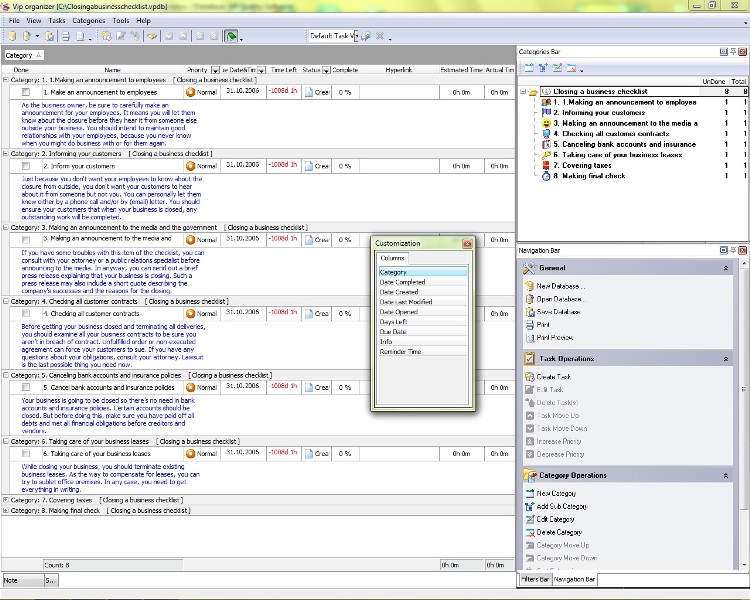
- Making an announcement to employees
As the business owner, be sure to carefully make an announcement for your employees. It means you will let them know about the closure before they hear it from someone else outside your business. You should intend to maintain good relationships with your employees, because you never know when you might do business with or for them again.
- Informing your customers
Just because you don't want your employees to know about the closure from outside, you don't want your customers to hear about it from someone but not you. You can personally let them know either by a phone call and/or by (email) letter. You should ensure your customers that when your business is closed, any outstanding work will be completed.
- Making an announcement to the media and the government
If you have some troubles with this item of the checklist, you can consult with your attorney or a public relations specialist before announcing to the media. In anyway, you can send out a brief press release explaining that your business is closing. Such a press release may also include a short quote describing the company's successes and the reasons for the closing.
- Checking all customer contracts
Before getting your business closed and terminating all deliveries, you should examine all your business contracts to be sure you aren't in ...breach of contract. Unfulfilled order or non-executed agreement can force your customers to sue. If you have any questions about your obligations, consult your attorney. Lawsuit is the last possible thing you need now.
- Canceling bank accounts and insurance policies
Your business is going to be closed so there's no need in bank accounts and insurance policies. Certain accounts should be closed. But before doing this, make sure you have paid off all debts and met all financial obligations before creditors and vendors.
- Taking care of your business leases
While closing your business, you should terminate existing business leases. As the way to compensate for leases, you can try to sublet office premises. In any case, you need to get everything in writing.
- Covering taxes
You should file an annual return for the year you close the business. If you have employees, you should submit the final employment tax returns. You will also need to submit returns to report disposing of business property.
- Making final check
Don't forget to make a final check just to be sure that you've covered all
| Order 750 checklists in MS Word and PDF printable format at $49.99 USD only. |
BUY NOW! |
|




 Play Demo >>




 FREE Download CentriQS