|
Task Management Software |
 |
|
|
|
|
| |
|
 TESTIMONIALS TESTIMONIALS
|
|
"...This is an excellent program. I'm so glad that I stumbled on to this when researching for task management programs. Very low learning curv, quite flexible, and the price is right. Tried at least 20 other programs, either too complicated, too expensive, or poor documentation..."
Chad Lindsey -
Honolulu, HI
|
|
|
|
|
|
|
|
Business letter checklist |
|
|
|
|
|
|

 |
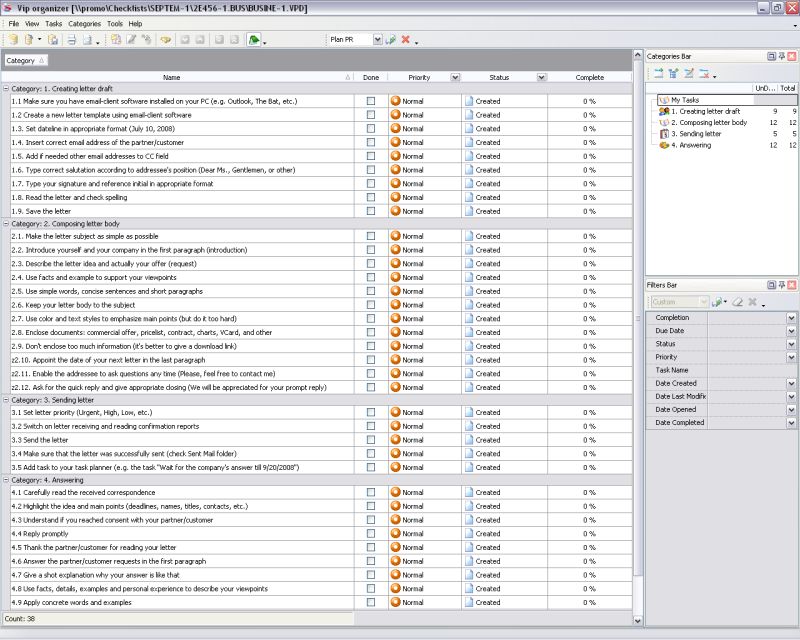
When you need to compose a business letter to your partner or customer, you need to think it over carefully and remember to follow the rule of four "C". It states that the letter should be: complete, concise, correct and clear. Using the business letter checklist you can establish fine business connections with your partners and customers.
|
| Order 750 checklists in MS Word and PDF printable format at $49.99 USD only. |
BUY NOW!  |
Business letter checklist
1. Creating letter draft
- Make sure you have email-client software installed on your PC (e.g. Outlook, The Bat, etc.)
- Create a new letter template using email-client software
- Set dateline in appropriate format ( July 10, 2008 )
- Insert correct email address of the partner/customer
- Add if needed other email addresses to CC field
- Type correct salutation according to addressee's position (Dear Ms., Gentlemen, or other)
- Type your signature and reference initial in appropriate format
- Read the letter and check spelling
- Save the letter
2. Composing letter body
- Make the letter subject as simple as possible
- Introduce yourself and your company in the first paragraph (introduction)
- Describe the letter idea and actually your offer (request)
- Use facts and example to support your viewpoints
- Use simple words, concise sentences and short paragraphs
- Keep your letter body to the subject
- Use color and text styles to emphasize main points (but do it too hard)
- Enclose documents: commercial offer, pricelist, contract, charts, VCard, and other
- Don't enclose too much information (it's better to give a download link)
- Appoint the date of your next letter in the last paragraph
- Enable the addressee to ask questions any time (Please, feel free to contact me)
- Ask for the quick reply and give appropriate closing (We will be appreciated for your prompt reply)
3. Sending letter
- Set letter priority (Urgent, High, Low, etc.)
- Switch on letter receiving and reading confirmation reports
- Send the letter
- Make sure that the letter was successfully sent (check Sent Mail folder)
- Add task to your task planner (e.g. the task "Wait for the company's answer till 9/20/2008")
4. Answering
- Carefully read the received correspondence
- Highlight the idea and main points (deadlines, names, titles, contacts, etc.)
- Understand if you reached consent with your partner/customer
- Reply promptly
- Thank the partner/customer for reading your letter
- Answer the partner/customer ...
| Order 750 checklists in MS Word and PDF printable format at $49.99 USD only. |
BUY NOW! |
|


 |
CentriQS Tasks Management Solution 
Looking for multi-user task management software? Try CentriQS complete task management solution for planning, tracking and reporting tasks, projects, and schedules. Increase productivity of your small business or office by better organizing your employees' tasks and time.
 FREE Download CentriQS FREE Download CentriQS
|
|
|
|
|
|
|
|
|
|
| CentriQS -15% OFF |
All-in-one business management software
for small and midsize enterprises |
|
|
|
| VIP Task Manager |
Multi-user project management software
to plan, schedule and track project tasks. |
 |
|
|
| VIP Checklists
|
More than 750 ready-to-use to-do lists
to plan your personal and business life |
 |
|
|
| VIP Team To Do List |
Professional task management software
to make and send team todo lists by email |
 |
|
|
| VIP Organizer |
Personal time management software
to organize time at home and at work |
 |
|
|
| VIP Simple To Do List
|
Simple and effective to-do list software
to plan daily chores, trips, wedding, etc. |
|
|
|
|
|
|
|
|



 Play Demo >>